
What Are Hotspots? Inside an Enhanced Virtual Tour
The difference between a tour someone wanders and one that actually leads somewhere.
Service and Format Guides · 5 August 2026 · 2 min read
Written by the Biztour team - Google Trusted Photographers since 2013.
A standard virtual tour lets someone look around. An enhanced tour, built with hotspots, gives them a reason to keep going: clickable points placed inside the scene that can carry information, images, video, or a direct call to action, right at the moment the visitor is standing in the room deciding.
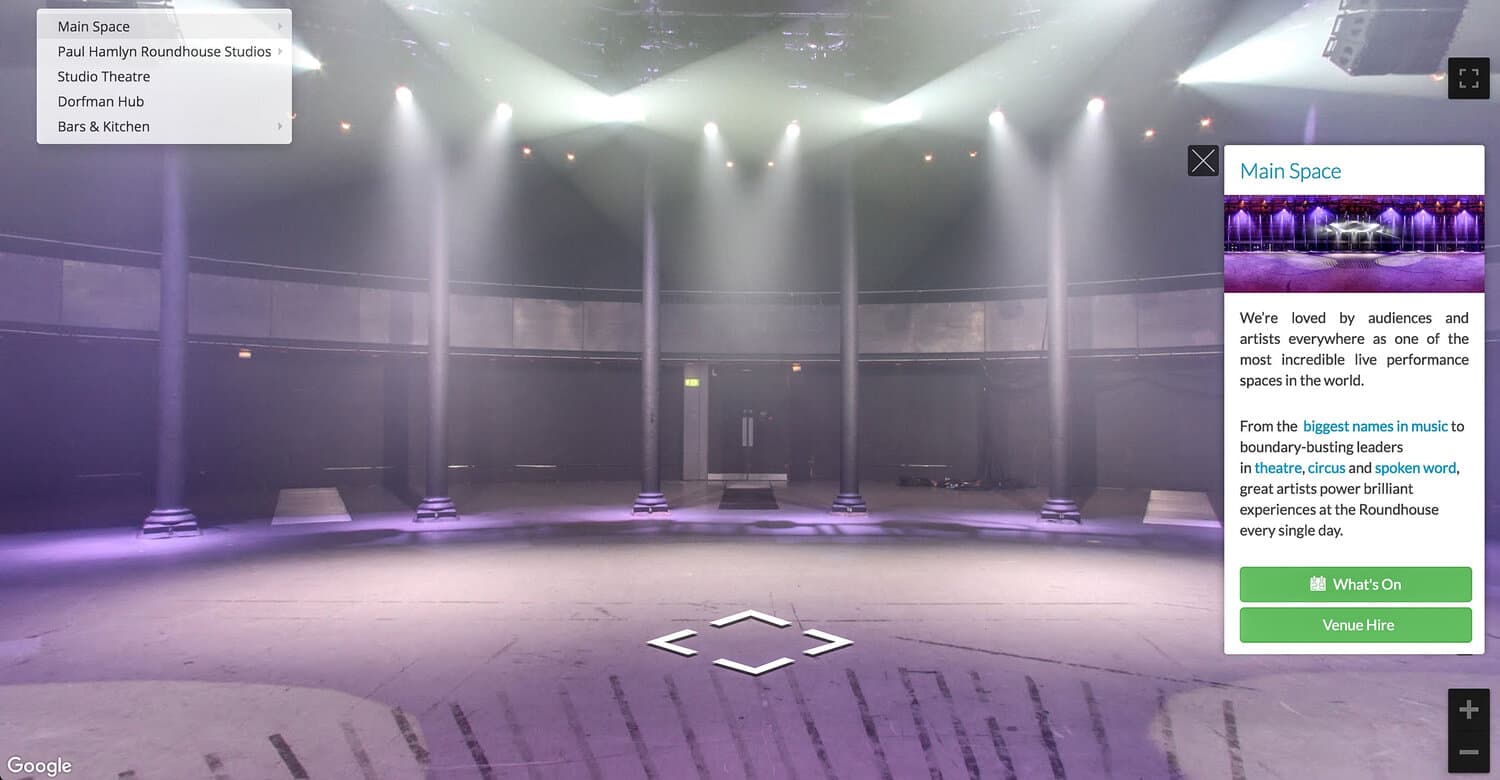
The Roundhouse's own enhanced tour is a real example live on their site: hotspots inside the main space carry information about the venue and a direct 'Venue Hire' button, placed exactly where someone considering hiring the space would want it.
- Up to 30 interactive hotspots included with an enhanced tour, £100 per 10 thereafter
- A hotspot can carry text, images, video, links or a direct enquiry call to action
- Placed inside the specific scene they're relevant to, not bolted on afterwards
- Turns a tour from something a visitor wanders into something that leads them somewhere
What a hotspot actually is
A hotspot is a clickable point placed inside a 360 scene, visible as a small icon a visitor can click or tap. What happens next depends on what it's set up to carry: an information panel about that specific room, an embedded image or video, a link to another page, or a direct enquiry or booking call to action.
The Roundhouse's tour uses exactly this: a hotspot in the main space opens a panel about the venue with 'What's On' and 'Venue Hire' buttons, right there in the room a hirer would be picturing their event in.
Want this costed for your own space?
Tell us the size of the place and what it is for. You get a written quote, and we aim to reply within 15 minutes in business hours.
Why placement matters more than the feature itself
The value of a hotspot isn't the interactivity, plenty of things online are technically clickable, it's where it sits. A pricing hotspot placed in the exact room it applies to answers a question before it's asked. An enquiry button placed in the space someone's just decided they like removes the extra step of finding your contact page separately.
That's the real shift from a standard to an enhanced tour: it stops being a passive look around and starts guiding a visitor along a deliberate route toward a decision.
What's included, and what costs extra
An enhanced tour is your base tier price plus £495, with up to 30 hotspots included as standard, enough for most single-location businesses to cover every scene with room to spare. Beyond 30, additional hotspots are £100 per 10. It's hosted at £60 a year, the same as a Matterport tour.
See it for yourself
Hedsor House - a live tour we shot, 267 scenes. Click and drag to look around.
Questions people ask
Can a hotspot link to an external website?
Yes, a hotspot can link to any URL, your booking system, a specific product page, or an external site, not just pages within the tour itself.
Do hotspots work the same on mobile?
Yes, hotspots are tap-to-open on mobile and click-to-open on desktop, the tour itself is fully responsive across devices.
Can we update hotspot content after the tour is live?
Yes, hotspot content can be updated without a full reshoot, useful for things like seasonal offers or updated pricing that change more often than the physical space does.
Enhanced virtual tours for every kind of business
Over 13 years of shooting means we've worked in almost every kind of space. Find yours to see what a tour does for your industry.
Trusted by














Ready to open your doors 24/7?
Our prices start at £525 and are based on your specific requirements. We aim to respond to all form submissions and email enquiries within 15 minutes during business hours.
5-star rated on Google


